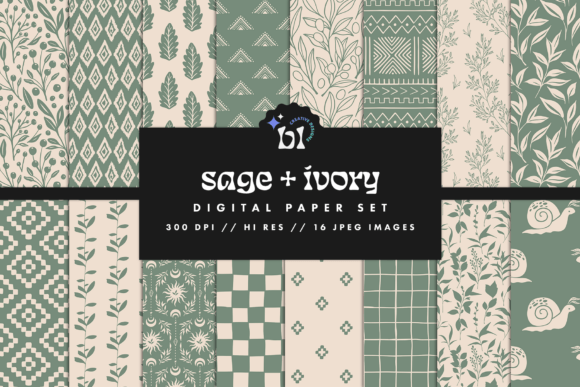
Ivory Sage Digital Paper: Elevate Your Creative Projects with Timeless Textures
Whether you're a seasoned designer or just starting to explore the world of digital art, having the right tools and textures can make all the difference. One standout resource for creative professionals and hobbyists alike is Ivory Sage Digital Paper. This collection offers 16 high-resolution JPEG files that provide seamless patterns and textures ideal for scrapbooking, planners, invitations, branding projects, and more. With each file designed at 300 DPI and sized at 12 x 12 inches, these digital papers are crafted for both print and digital use, making them incredibly versatile in modern creative workflows.
What Makes Ivory Sage Digital Paper Unique?
The beauty of Ivory Sage Digital Paper lies in its simplicity and elegance. The color palette is soft and neutral, which makes it easy to pair with a wide range of designs without clashing. These textures mimic the look of aged paper, linen, parchment, and other organic surfaces, giving your projects a tactile feel even when they’re purely digital. They’re perfect for those who want to add depth and character to their layouts but don’t have access to physical materials or prefer the convenience of digital assets.
One of the key features of this product is its seamless design. Unlike some digital textures that repeat awkwardly or create visible lines, Ivory Sage ensures a smooth, continuous pattern. This allows you to tile the images as needed without worrying about disrupting the visual flow of your project. It’s a subtle yet powerful detail that enhances the professionalism of any work it's applied to.
High-Resolution Quality for Professional Results
Each image in the Ivory Sage Digital Paper set is created at 300 DPI, which is the standard resolution for professional printing. This means you can confidently use these textures in print-based projects such as wedding invitations, greeting cards, and branded merchandise, knowing that the final output will be crisp and clear. For digital uses like website backgrounds, blog headers, or social media graphics, the quality remains impressive on screens of all sizes.
With a size of 12 x 12 inches, the papers are also well-suited for standard-sized craft projects. Many designers and artists work within common page dimensions, and these files align perfectly with those specifications. Whether you're working in Adobe Photoshop, Canva, or any other design software, you’ll find the sizing convenient and adaptable.
Applications Across Industries and Hobbies
Digital Scrapbooking: If you're into memory keeping and crafting, you know how important texture is in bringing your pages to life. Ivory Sage Digital Paper adds a touch of sophistication and warmth to digital scrapbook layouts. You can layer it beneath photos, journaling blocks, or embellishments to give your creations a vintage or elegant feel without sacrificing clarity.
Planner Design: Handmade and digital planners are booming in popularity, especially among those who love organization and personal expression. These textures help elevate the aesthetic of weekly spreads, goal-setting pages, and bullet journals. Their subtle grain and soft tones complement minimalistic designs while still allowing text and illustrations to stand out.
Wedding Invitations and Stationery: When designing wedding stationery, every detail counts. Ivory Sage Digital Paper brings an air of refinement to save-the-dates, invitations, RSVP cards, and thank-you notes. Its natural appearance gives the impression of handcrafted elements, which is often what couples are looking for in their special event designs.
Branding and Marketing Materials: Businesses that prioritize a clean, timeless look can benefit greatly from incorporating these textures into their branding. Use them as background layers in logo mockups, brochures, packaging designs, or even email templates. The understated nature of the textures ensures your brand message remains front and center while still adding a refined visual element.
Websites and Blogs: In web design, texture can help break up flat areas and add visual interest. Ivory Sage Digital Paper works well as subtle background textures for landing pages, blog posts, or portfolio sites. Because they're neutral, they won’t distract from content but instead enhance the overall atmosphere of the site.
Why Choose Ivory Sage Over Other Digital Papers?
- Neutral Color Palette: The ivory and sage tones are universally flattering and blend seamlessly with most color schemes. This makes the papers highly adaptable across different themes and styles.
- Commercial Use Allowed: One of the biggest concerns when sourcing digital assets is whether they can be used for commercial purposes. Ivory Sage Digital Paper is explicitly licensed for commercial use—just be sure to review the terms provided by the seller before using them in client work or for-profit ventures.
- Instant Download Convenience: There's no waiting for shipments or delays in delivery. Once purchased, you'll receive a .ZIP file containing all 16 textures immediately. This makes it easy to start working on your next project right away.
- Compatibility with Major Software: The JPEG format is widely supported, so you can open and edit these files in almost any design program. Whether you're using Photoshop, Illustrator, Procreate, or online tools like Canva, you’ll find these textures easy to integrate into your workflow.
How to Integrate Ivory Sage Digital Paper Into Your Work
Incorporating Ivory Sage Digital Paper into your designs doesn't require advanced technical skills. Here are a few simple techniques to get started:
- Layer Under Content: Open your design software and place one of the textures beneath your main design elements. Adjust the opacity if needed to let your content shine through while still benefiting from the added depth.
- Use as Backgrounds: For minimalist designs, consider using a single Ivory Sage texture as a full-page background. Pair it with bold typography or vibrant colors to create striking contrast.
- Overlay for Texture: Apply the texture as an overlay with blending modes like Multiply or Overlay to subtly influence the underlying design. This is particularly useful for photo editing or creating matte finishes.
- Printed Projects: When preparing for print, ensure the texture is placed correctly and scaled to fit the intended paper size. Because they're high-resolution, you can print at large sizes without losing quality.
Best Practices for Using Digital Textures
To get the most out of Ivory Sage Digital Paper, consider the following tips:
- Always work in a non-destructive way by using adjustment layers rather than altering the original texture directly.
- Experiment with different blending modes to see how the texture interacts with your design elements.
- Don’t overdo it. These textures are meant to enhance—not overwhelm—your layout. A little goes a long way.
- Combine multiple textures for a layered effect. Try stacking two or three Ivory Sage papers at varying opacities to create unique, custom backgrounds.
Real-World Examples and Scenarios
Here are a few real-world scenarios where Ivory Sage Digital Paper has been put to great use:
Scenario 1: Wedding Planner
A wedding planner wants to create a cohesive suite of digital invites and thank-you cards. By using one of the Ivory Sage textures as a base, she adds a warm, classic tone to her designs. The subtle grain gives the illusion of hand-printed materials, enhancing the perceived value and elegance of the products.
Scenario 2: Branding Project
A small business owner is launching a new line of wellness products and needs branding materials that reflect calm and natural aesthetics. She downloads the Ivory Sage Digital Paper pack and applies one of the linen-style textures to her brochure and label designs. The result is a polished, organic look that resonates with her target audience.
Scenario 3: Personal Planners
An artist creates monthly planners for sale online. To differentiate her product from others, she uses Ivory Sage textures to build a vintage-inspired theme. The papers are printed at high quality, ensuring customers enjoy the same premium feel as traditional handmade planners.
Common Considerations Before Purchase
Before downloading Ivory Sage Digital Paper, many users have questions about licensing, compatibility, and usage rights. Here are some of the most common considerations addressed:
- Licensing Terms: Commercial use is allowed, but always check the specific terms provided by the seller. Some may require attribution or restrict resale of the exact texture as part of another product.
- File Format: JPEG is a lossy format, but it's excellent for fast loading and broad compatibility. If you need editable layers or transparency, look for other formats like PNG or PSD.
- Printing Requirements: While these papers are suitable for printing, always confirm your printer supports high-resolution JPEG files and recommends proper calibration for accurate results.
- Storage and Organization: Since you receive a .ZIP file with 16 images, it’s wise to extract and organize them in a dedicated folder. This helps streamline your workflow and makes it easier to locate the right texture for your project.
If you have further questions or need assistance, the creator encourages reaching out directly for support. This personalized approach ensures you get the most out of your purchase and understand how best to apply the textures in your unique context.
Getting Started with Ivory Sage Digital Paper
If you're ready to bring a touch of timeless charm to your designs, Ivory Sage Digital Paper is an excellent choice. Its versatility, high-quality resolution, and seamless repetition make it a go-to asset for both personal and professional projects. From scrapbooking to branding, these textures offer a subtle yet impactful enhancement to any layout.
Start by selecting the texture that best complements your current project. Then experiment with layering, blending modes, and placement to discover the perfect balance. As you become more familiar with how these papers interact with your designs, you’ll likely find yourself reaching for them again and again.
Remember, because this is an instant download, you won’t need to wait for anything to arrive in the mail. Just click, download, and begin transforming your digital workspace today.